
Welcome to Career Brochure!
We are building a free resource for everyone to find career related information to help start and grow in their careers. We are adding more useful information regularly. So please check back frequently.
Career Resources
Use these resources to help you start and get ahead in your career.
 Make a perfect resume: For any job posted, there are many resumes that are submitted. Human Resources has the arduous task of filtering though the resume. In order to get selected you have you be sure your resume highlights the relevant work experience and skills or you may not make the cut. Do not make common resume mistakes that people make as this will give an indication that you are not serious about this application.
 Prepare for your interview: So you have landed an interview for your dream job but are not sure if you will be able to crack the interview? How do you prepare for the interview? Note down things you want to say during the interview. Prepare for common questions. Be prepared for technical questions.
 Highlight your skills: An interview is the best time to showcase your talent, skills and abilities. If you have prepared well, you will be able to guide the interviewer in such a manner that you are able to highlight your strength and use your weakness to your advantage. Focus on all types of skills – technical, analytical and soft skills. People tend to ignore the importance soft skills during an interview which can be a big mistake.
 Thank the Interviewer: This is your last opportunity to show why you are the best candidate for this position. For this use the thank you letter to convey that you were listening during the interview, if there is any follow-up item be sure to include those (such as links to your portfolio, website, etc.). Thank the interviewer for the time and
 Impress during your internship: Several companies extend full-time offers to their interns before they consider new applicants. This is beneficial for them as they get an employee who is trained for the task they expect him / her to do after joining. However only the top performing interns are typically hired back. If you have landed an internship, it is your responsibility show your abilities and skills and convert this internship opportunity in to a full-time position.
 Importance of professional network: Many people only look at traditional ways to get a job such as applying to job opening on company’s site and on job boards and ignore the best way to get a job, leveraging your professional network. One must learn how to build a professional network and use it for job search. Several openings are never published as they filled by references and recommendations.
Medical Careers
 A Licensed Practical Nurse (LPN) works under the supervision of doctors or registered nurses to provide care for patients who need medical attention due to a sickness, injury or disability. Some states refer to LPNs as Licensed Vocational Nurse (LVN). An LPN typically needs to pass the National Council Licensure Examination after a two year training.
 A Certified Nursing Assistant (CNA) works under the supervision of other nursing staff to provide basic patient care. While the exact responsibilities vary from state to state and the place of work, some of the common duties are to groom, bathe, dress the patient and perform activities like change linens, help in moving patient etc.
 Pharmacy technicians work under the guidance and supervision of Pharmacist. Their roles and responsibilities may vary by their work environment but ate typically required to help pharmacists fill prescriptions for customers or doctors. A certification or diploma is required in most states to become a Pharmacy technician.
Specialty Careers
 Actuary often require certifications and possess degrees in Mathematics or Statistics and are commonly employed in the Insurance industry. They work to assess the likelihood of an event occurring and the associated risk which aides in the deployment of policies for business and clients.
 Architect often require degree in architecture, and have to pass a licensing exam known as the Architect Registration Exam. Architects design buildings, homes, bridges and various other structures. They often tend to specialize in a sub-field. Architects are typically known for their design style and work and often aim to have a marquee project.
 Paralegals, sometimes also referred to as legal assistants, provide various tasks to assist a lawyer. Some of the common duties a Paralegal is expected to fulfill is conduct legal research, draft legal documents, organize documents, etc. A certification may help but is often not required to become a Paralegal.
Public Service
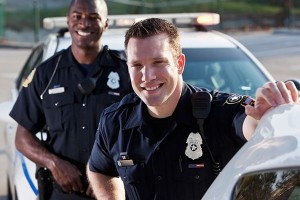 Police Officers typically are required to complete a high school diploma to college. Training and licensing may also be required based on the place of work. This job can be physically demanding and often dangerous. Police officers play an important role in maintain law and order and protect lives and property.
 Teachers are the backbone of any civilized society as they train and educate the future generations. Common responsibilities of a teacher are to teach a class, prepare and grade tests, prepare assignments, monitor a student’s progress and much more. A teacher may also have several administrative duties bases on the setup he or she works in.
Engineering Careers
 Civil Engineers often require a degree in Civil engineering and may need a license based on the location of work and services provided. Commonly civil engineers help design, construct and operate infrastructure and building projects. They may work indoors or at constructions sites depending on the project and the state of the project.
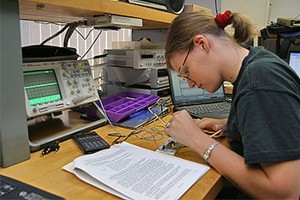 Computer Engineer are often people who graduate with a degree in Computer Engineering or Computer Science. The work responsibilities are often wide ranged as computer engineers are employed in several industries from. The work environment is also varied but is often some kind of laboratory or an office.
 Electrical Engineer work in wide range of setup and work on a wide range or projects such as designing, developing and testing electric motors, power generators, transmission systems, electrical circuits, etc. In order become an electrical engineer once typically has to complete a degree in electrical engineering.
 Software Engineer also known as software developer typically have degrees in computer since or some form of training in programming language. While these are not required, they are something employers look for in software engineers. The work environment is typically in offices and often casual clothing. Several software engineers also work remotely.
More information and resources is added frequently to the site. Please check back soon.